60 Night Risk-Free Trial
Trusted by over 10,000+ customers
Doctor and Parent Approved
Have an account?
Log in to check out faster.
Spend $50 more to get FREE shipping!
Loading...
1. Set The Current Time
2. Set Alarm 1
3. Set Alarm 2
4. Turn an Alarm OFF
5. Charging Your Dawn Band
1. Wake the screen
- Tap the button once to show the time.
2. Enter Time Set mode
- From the time screen, press & hold the button for ~3 seconds
- The hour will start flashing.
3. Set the hour
- Tap the button to increase the hour (each tap = +1).
4. Set the minutes
- Press & hold ~3 seconds again to switch to minutes (minutes flash).
- Tap to increase minutes.
5. Save & exit
- Stop pressing buttons and wait ~8 seconds.
- It will save and return to the normal time screen.
1. Go to Alarm 1 screen
- From the time screen, tap the button 5 times until you see Alarm 1. - If it shows “OF”, that alarm is OFF.
2. Turn Alarm 1 ON + set time
- Press & hold ~3 seconds to start setting Alarm 1. - The hour will flash. - Tap to adjust the hour.
3. Set minutes
- Press & hold ~3 seconds to switch to minutes (minutes flash). - Tap to adjust minutes.
4. Save & Exit
Stop pressing buttons and wait ~8 seconds to save.
1. Go to Alarm 2 screen
- From the time screen, tap the button 6 times until you see Alarm 2. - “OF” = OFF.
2. Turn Alarm 2 ON + set time
- Press & hold ~3 seconds to set it. - Tap to set hour → hold ~3 seconds → tap to set minutes. - Wait ~8 seconds to save.
- Go to the alarm screen (Alarm 1 = 5 taps, Alarm 2 = 6 taps) - Set it to “OF” (OFF)
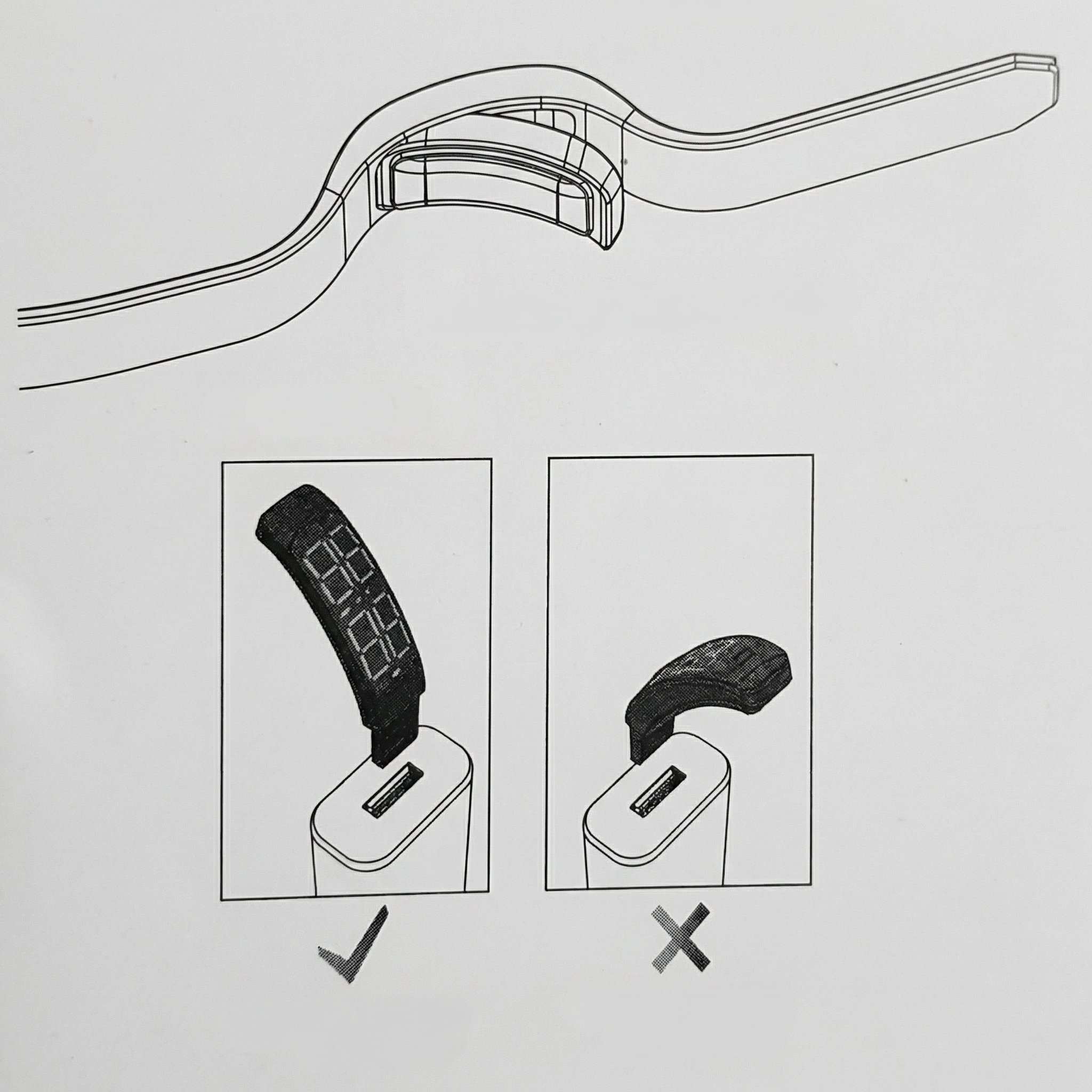
Locate the built-in USB charging connector on the end of the band.
Plug the USB connector directly into a low-power USB source, such as:
- A laptop USB port
- A desktop computer USB port
- A standard low-output USB hub (5V)
Insert the band straight and level into the port. (Refer to image above)
Allow the band to charge fully before first use.